Affiliate Link Integrity Checker
Revenue link monitoring and repairWordPress plugin
Your links still open. Your revenue path can still be broken. Catch it.
A dropped affiliate ID, a swapped destination, a revenue page that turned noindex. Affiliate Link Integrity Checker finds the changes a link checker calls healthy, and repairs the ones it can restore exactly as they were recorded.
Who it’s forSite owners with many affiliate links or outbound CTAs who cannot recheck every post after every update
Pro$129/year and up · 3 plans
- Free version has no item limits
- Changes shown first and can be undone
- Diagnostics never leave your site
- Available on WordPress.org
What it does
Notice the changes that stop revenue, and put them back as recorded
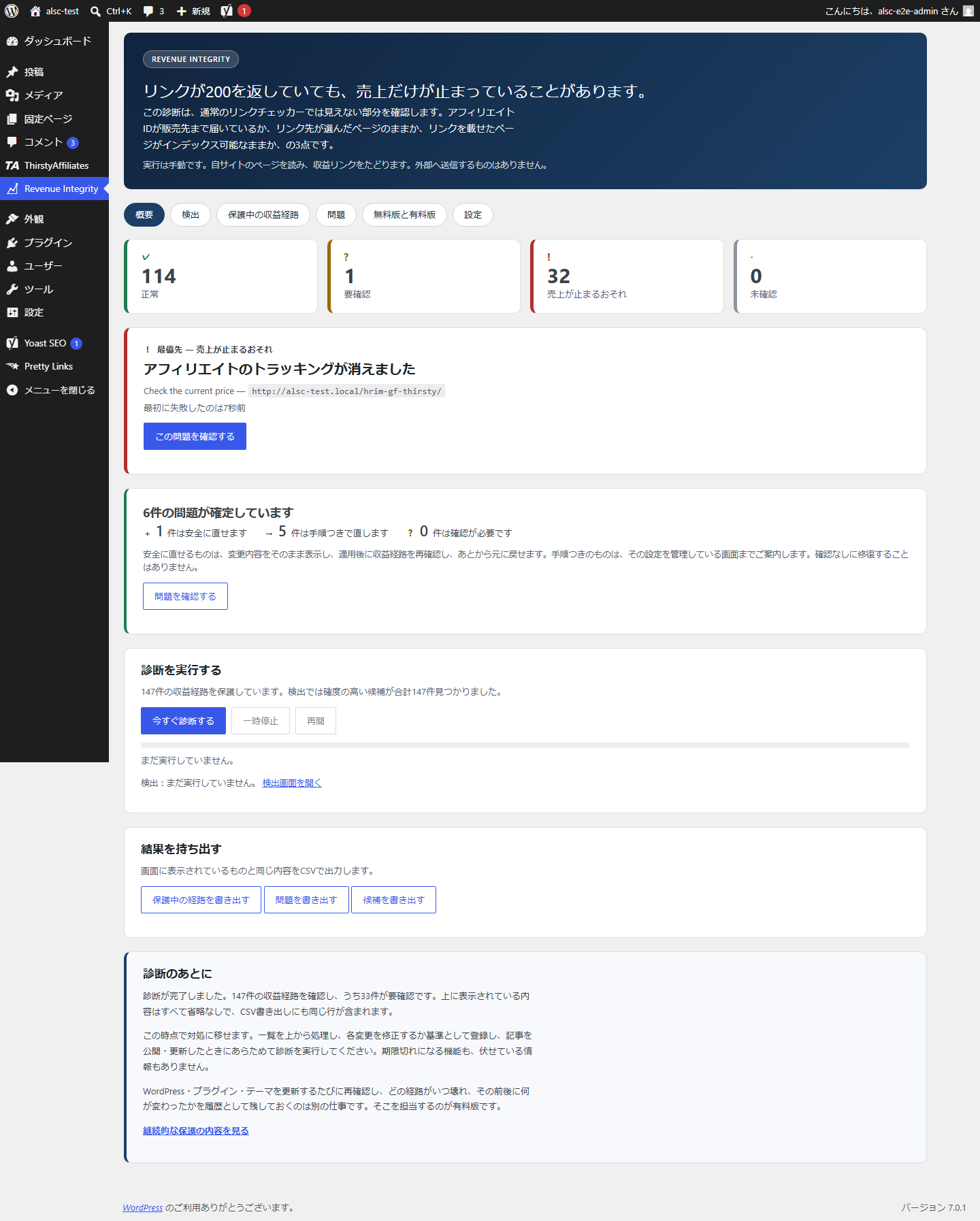
Find revenue links that broke while still loading normally
The problemA link checker reports any link that opens as healthy
Each revenue path is checked: does the affiliate ID reach the merchant, is the destination still the page you chose, is the post still indexable
The revenue you were quietly missing shows up as a list, with evidence
Fix it where you find it
The problemDetection alone still leaves you fixing every item by hand
Restore a dropped affiliate parameter, a Pretty Links or ThirstyAffiliates destination, or a missing rel attribute to its recorded value, after seeing the exact change
The path is rechecked automatically after the fix, and you can undo it
No more false alarms
The problemFirewall blocks (403) and rate limits fill reports with false broken links
403s, 429s and temporary timeouts are reported as “could not verify”, and URL formatting differences and click IDs are normalized before comparing
You start with the problems that actually need you
Keep watching after updates (Pro)
The problemRechecking every post after each WordPress or plugin update is not realistic
Pro adds scheduled monitoring, rechecks right after updates, bulk repair and email alerts when something breaks
You hear about a break when it happens, and the history shows what changed
Screenshots
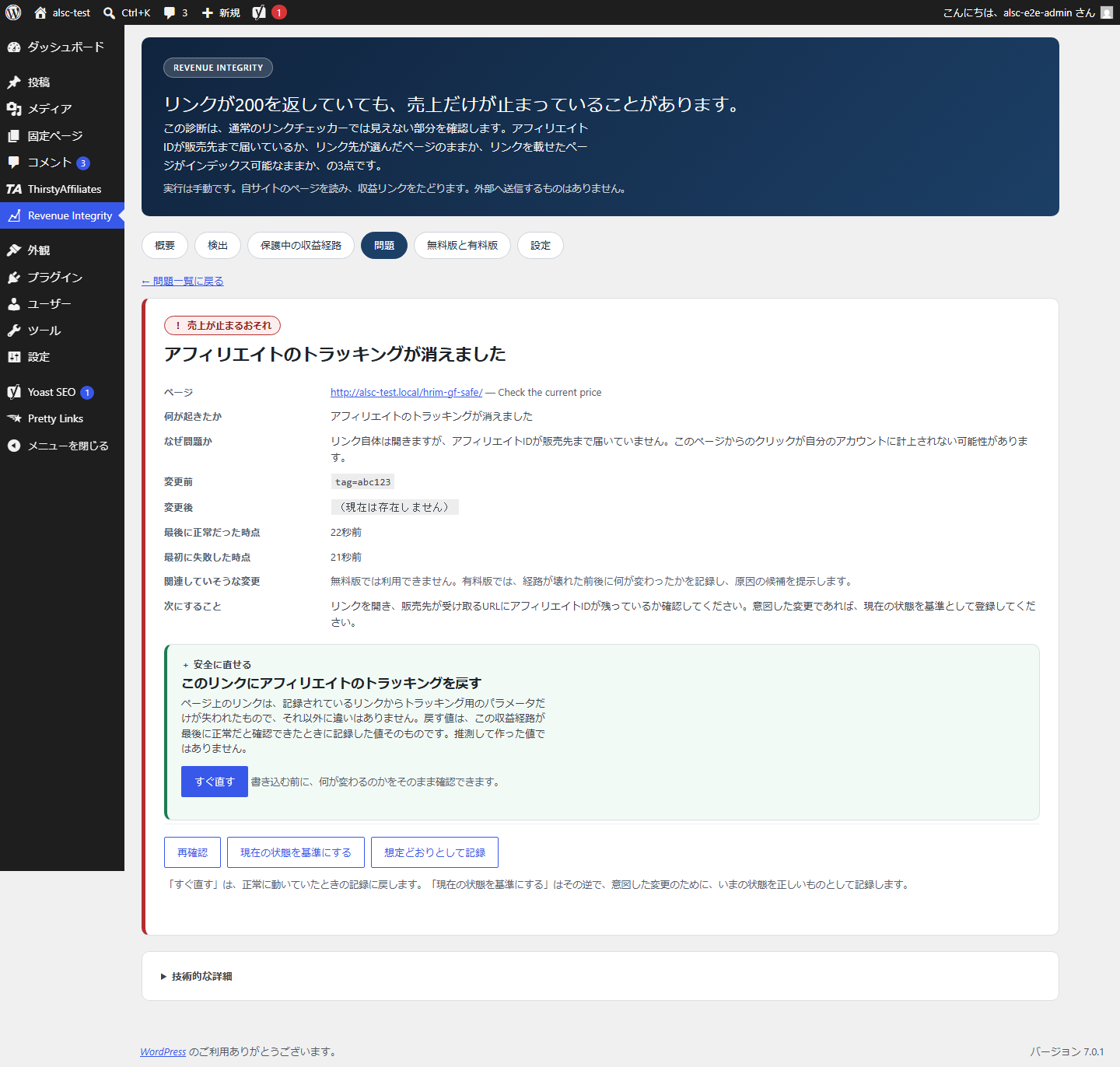
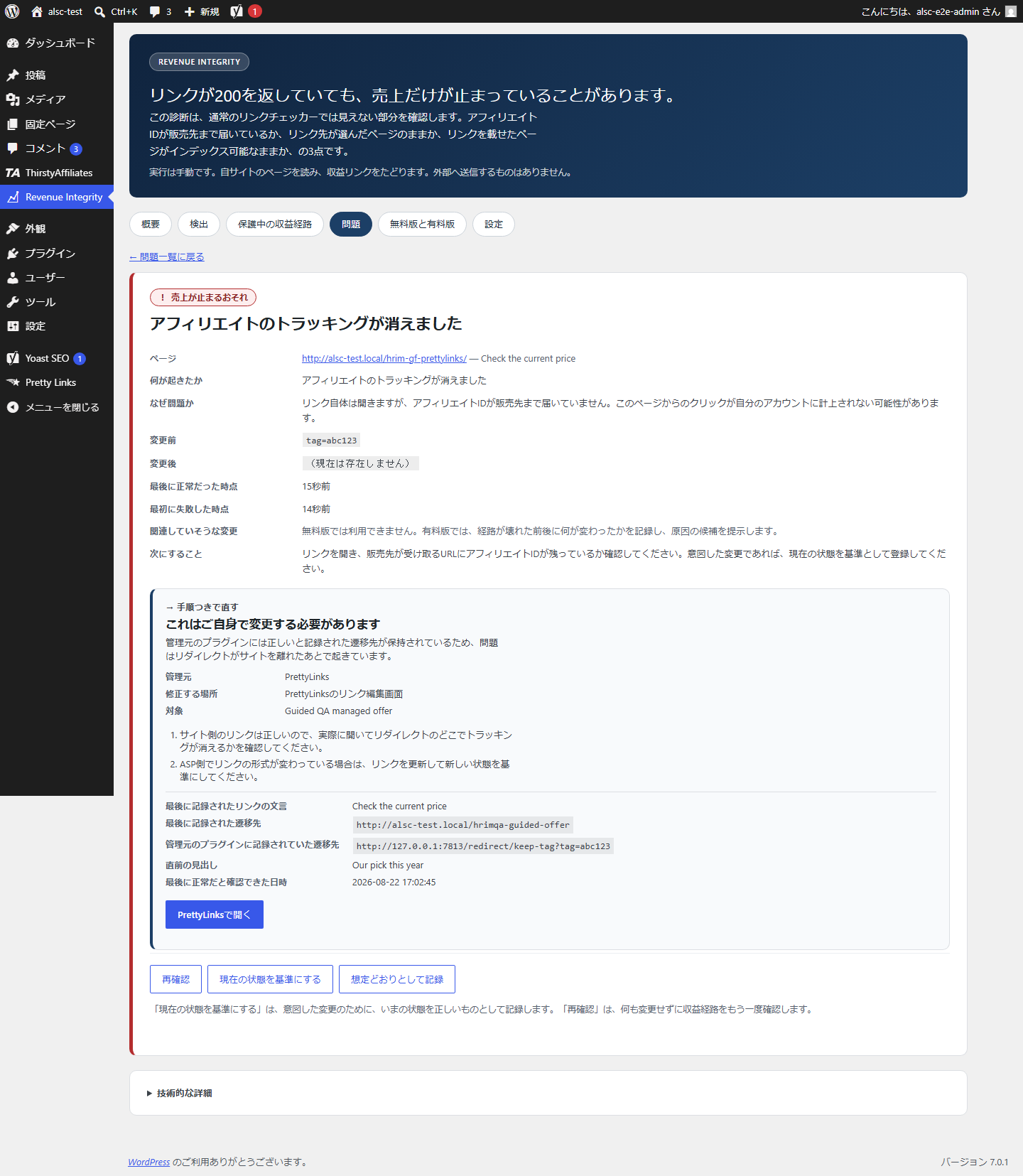
See what happened, with the evidence
Free and Pro
Start free. Add Pro when you need it.
Free
Automatic detection of revenue links, diagnosis from eight angles, confirmed repair and CSV export. No item limits.
Revenue Integrity Monitor Pro
Everything in the free version, plus scheduled monitoring, rechecks right after updates, bulk repair, issue history with likely causes, and email alerts.
| Features | Free | Pro |
|---|---|---|
| Automatic detection of revenue links | ✓ | ✓ |
| Eight-point diagnosis (no item limits) | ✓ | ✓ |
| Repair after you confirm, with undo | ✓ | ✓ |
| CSV export | ✓ | ✓ |
| Scheduled background monitoring | — | ✓ |
| Recheck right after WordPress, plugin and theme updates | — | ✓ |
| Repair several issues at once | — | ✓ |
| Issue history and likely causes | — | ✓ |
| Email alerts when an issue appears | — | ✓ |
Pricing
Choose a plan for the number of sites you run
Every plan includes every Pro feature. The only difference is how many sites you can activate the license on.
Every plan is a subscription that renews automatically until you cancel. You can cancel at any time and keep using Pro until the end of the period you have paid for. Payment happens on Stripe’s checkout page, and your license key and download appear as soon as payment completes. Refund and cancellation policy (Japanese)Legal notice (Japanese)
Want to try it first? Get the free version (free, no item limits)
Use cases
When it helps
When a network or merchant changes something
An ID dropped in a redirect, a product page that ended and now lands on the store front. These are caught even while the link still opens.
After changing a link manager or SEO settings
Pretty Links and ThirstyAffiliates destinations and noindex flags are checked, and anything that can be restored as recorded is restored on the spot.
When every update needs a check (Pro)
Right after a WordPress, plugin or theme update, the affected revenue paths are rechecked automatically.
When you run several sites (Pro)
Portfolio covers up to 5 sites and Agency up to 20. One license watches all of them.
Features
All features
Find
- Detects revenue links from Pretty Links, ThirstyAffiliates, sponsored attributes, known affiliate parameters and more
- Missing link elements and swapped destinations, including a product page falling back to a home page
- Tracking integrity: is the affiliate ID still present on the URL that reaches the merchant
- Redirect loops and unfinished redirects, unreachable pages (404, repeated 500)
- Revenue pages turned noindex, or pointed at a different preferred URL
Verify
- Evidence for every issue: before, after, last known good and first failure
- 403, 429 and temporary timeouts reported as “could not verify”
- Parameter order, URL encoding, trailing slashes and http-to-https moves normalized before comparing
- Intended changes recorded with “Use current state as baseline”
Fix
- Restores dropped affiliate parameters, link manager destinations and rel attributes (sponsored, nofollow) to their recorded values
- Shows the change before applying it, rechecks afterwards, and can undo it
- Issues it does not fix automatically come with the owning plugin and the screen to fix them
- Exports issues, candidates and protected paths as CSV
Keep watching with Pro
- Scheduled background monitoring
- Recheck right after WordPress, plugin and theme updates
- Repair several issues at once
- Issue history, related changes and likely causes
- Per-path tracking, redirect and merchant policies
- Email alerts when an issue appears
How it works
Getting started
Install and run a check
Activate the free version and run a check. Revenue links are found and recorded as revenue paths. Nothing to configure.
Review issues in three groups
Each issue is “safe to fix”, “guided fix” or “needs review”, with the evidence behind it.
Fix on the spot
Apply safe fixes after seeing the exact change. Everything else comes with directions to where it is fixed.
Add Pro to keep watching
Activate Pro to start scheduled monitoring and post-update rechecks, with email alerts when something breaks.
Frequently asked questions
Frequently asked questions
How is this different from a regular link checker?
A link checker asks whether a URL responds. This plugin asks whether the revenue conditions behind that URL still hold: does the affiliate ID reach the merchant, is the destination still the page you chose, is the post carrying the link still indexable. Each of these can break while the link keeps returning 200.
Can I use only the free version?
Yes. The free version has no time limit and no item limits, and it covers diagnosis and confirmed repair. Pro adds the part that keeps watching on its own, such as scheduled monitoring and rechecks after updates.
Will it change my posts without asking?
No. Diagnosis only reads. A repair runs only when someone who can edit posts presses the button after seeing the before and after, and it can be undone.
How much can it fix automatically?
Three things, each restored to its recorded value: a dropped affiliate parameter, a destination recorded in Pretty Links or ThirstyAffiliates, and a missing rel attribute. It never guesses a value. For everything else it shows where and how to fix it.
What is the difference between the plans?
Pro, Portfolio and Agency include the same features. They differ in how many sites the license can be activated on (1, 5 and 20). Each is available monthly or yearly.
Can I cancel at any time?
Yes. Payment methods, invoices and cancellation are handled in the Stripe Customer Portal, linked as “Manage billing” on your purchase completion page. After cancelling you keep Pro until the end of the period you paid for.
Will it flood merchants with requests?
No. It spaces out requests to each destination and caps the number per run. When it receives a 429 (rate limit), it waits before checking that destination again.
Do I need Pretty Links or ThirstyAffiliates?
No. If either is installed, their link identifiers are used for more precise tracking. Affiliate links written directly in your posts work too.
Before you buy
Terms and support
From purchase to first use
- Choose a plan in the pricing section and complete payment on Stripe’s checkout page
- Your license key and a download button for the Pro ZIP appear on the completion page
- Install the ZIP from Plugins → Add New → Upload Plugin in your WordPress admin and activate it
- Enter your license key on the plugin’s screen to activate it
License, updates, cancellation and purchase recovery
- Each plan sets how many sites the license can be activated on (Pro 1, Portfolio 5, Agency 20). Deactivate it on a site you no longer use to move it to another
- Subscriptions renew automatically until you cancel. After cancelling you keep Pro until the end of the period you paid for
- Payment methods, invoices and cancellation are handled from “Manage billing” on your purchase completion page
- Sites with an active license receive Pro updates from the normal WordPress Updates screen
- Lost your license key or download? Use purchase recovery
- See the refund and cancellation policy and the legal notice (both in Japanese)
What it does not do
- Automatic repair covers only the three things it can restore as recorded: affiliate parameters, link manager destinations and rel attributes. It does not rewrite post content or change SEO or theme settings
- It never guesses a correct URL or affiliate ID
- It does not track clicks or conversions, shorten links or cloak them (that is what link managers do)
- It does not estimate lost revenue
- Neither the free version nor Pro monitors from outside servers or by driving a browser
- It does not promise higher rankings or revenue
Data handling
| Data sent elsewhere | Diagnostics, post content and affiliate IDs are never sent to an outside service |
|---|---|
| Where it connects | Only to your own pages and to the destinations your links already point to |
| Connection safety | Requests to your own network and to cloud metadata addresses are refused, at every redirect step |
| Request rate | Requests are spaced per destination and capped per run |
| What it stores | Detected paths, baselines, observations, issues and repair records (including previous values) in tables on your site |
| On uninstall | Those tables and settings are removed |
| Pro license checks | Pro contacts the HUBLO license server to check the license and updates |
Requirements
- WordPress 6.2 or later
- PHP 7.4 or later
Getting the free version
WordPress.org plugin page. You can also search for “Affiliate Link Integrity Checker” under Plugins → Add New in your WordPress admin.
Catch the changes that stop revenue, early
Start with the free version and check your site today. When you want every update checked for you, add Pro.
Pro$129/year and up · 3 plans