Duplicate Content Finder
Duplicate content cleanupWordPress plugin
Stop your posts from competing. Keep the right one, for clear reasons.
Find posts that overlap, get a suggestion of which version to keep based on six signals, and see what a merge would lose before you merge. With Pro, run the merge, create the 301 redirect and update internal links inside WordPress.
Who it’s forSite owners whose long-running sites have collected similar posts and who can no longer tell which ones to keep
Duplicate Content Auditor Pro¥4,980 (one-time purchase) · 1 site
- Free version has no item limits
- Works with Japanese, Chinese and Korean text
- Free version never edits posts
- Available on WordPress.org
What it does
Find duplicates, choose the version to keep, and check what you would lose before merging
Measure how much overlaps
The problemYou suspect duplicates exist but cannot tell where
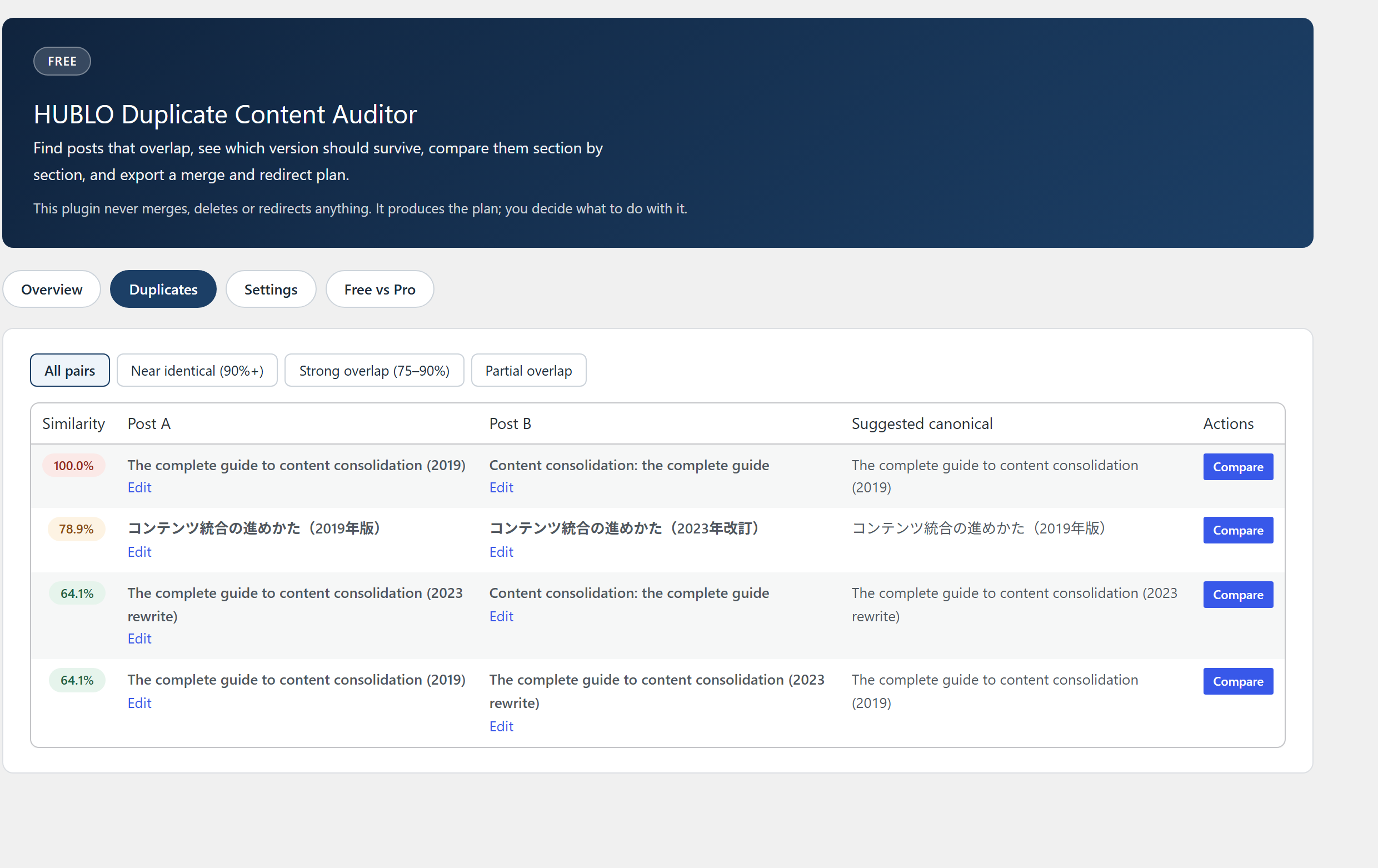
Each post is fingerprinted so only likely pairs are compared, and pairs are ranked by similarity as near-identical, strong or partial overlap
Even on a large site, you know where to start
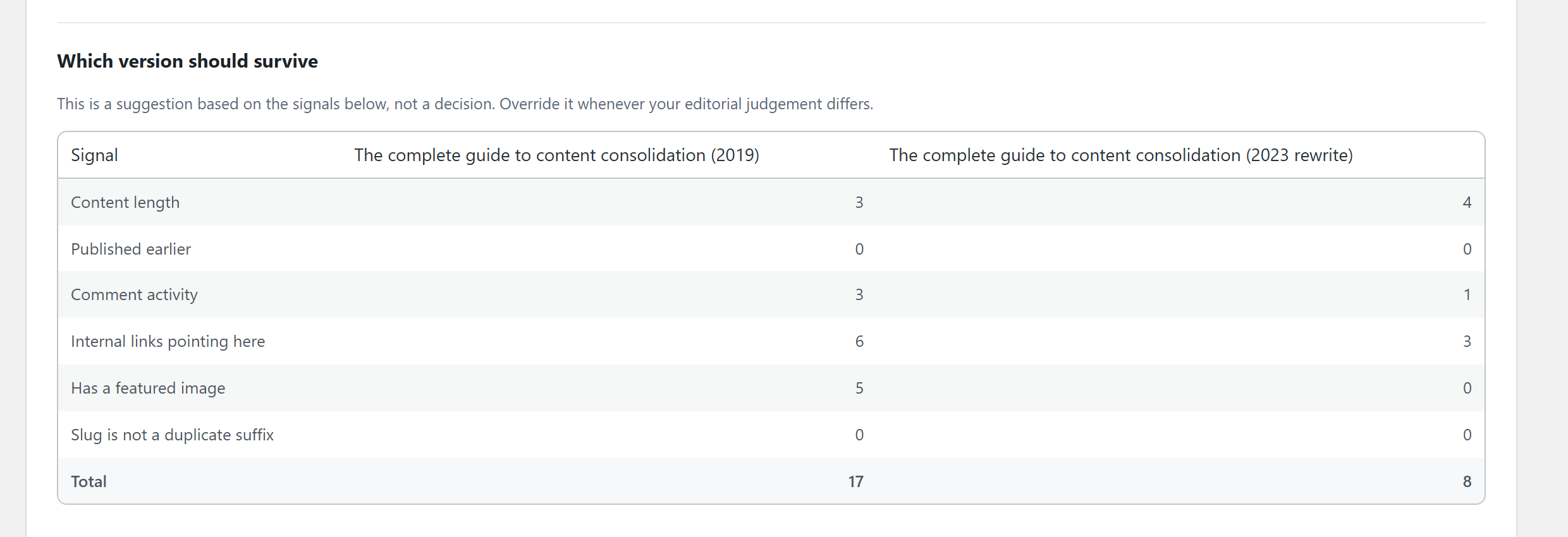
Choose the version to keep, with reasons
The problemYou have no clear basis for choosing which post to keep
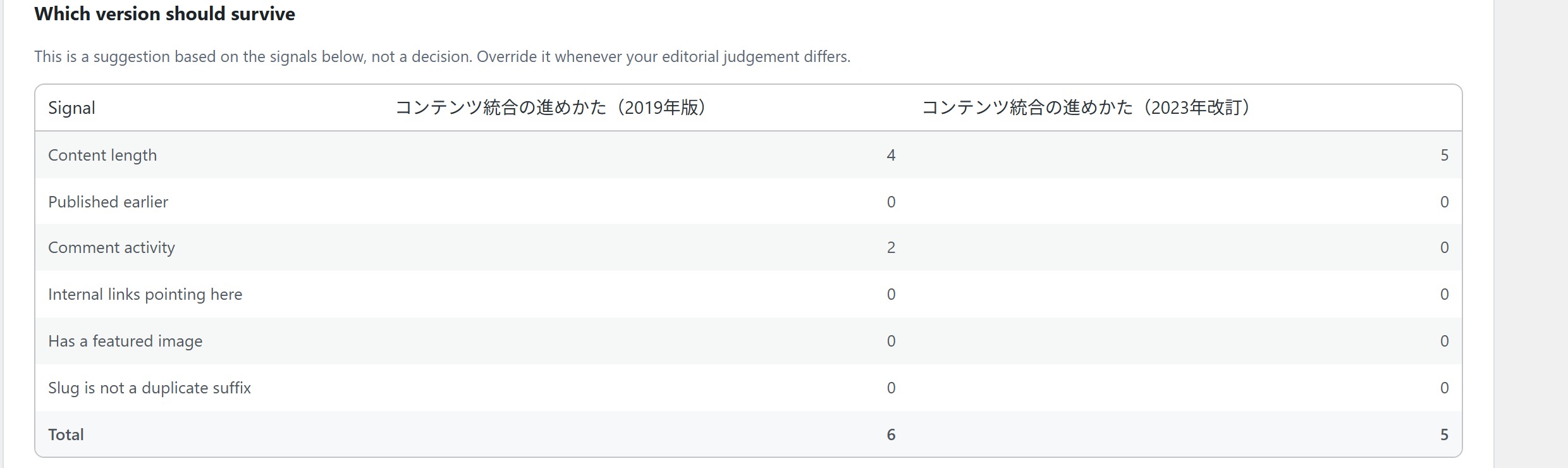
Both posts are scored side by side on six signals: length, publish date, comments, internal links in, featured image and slug
You see the reasons, not just a verdict, and can overrule it editorially
See what a merge would lose, first
The problemYou only notice content that existed in the removed post after the merge
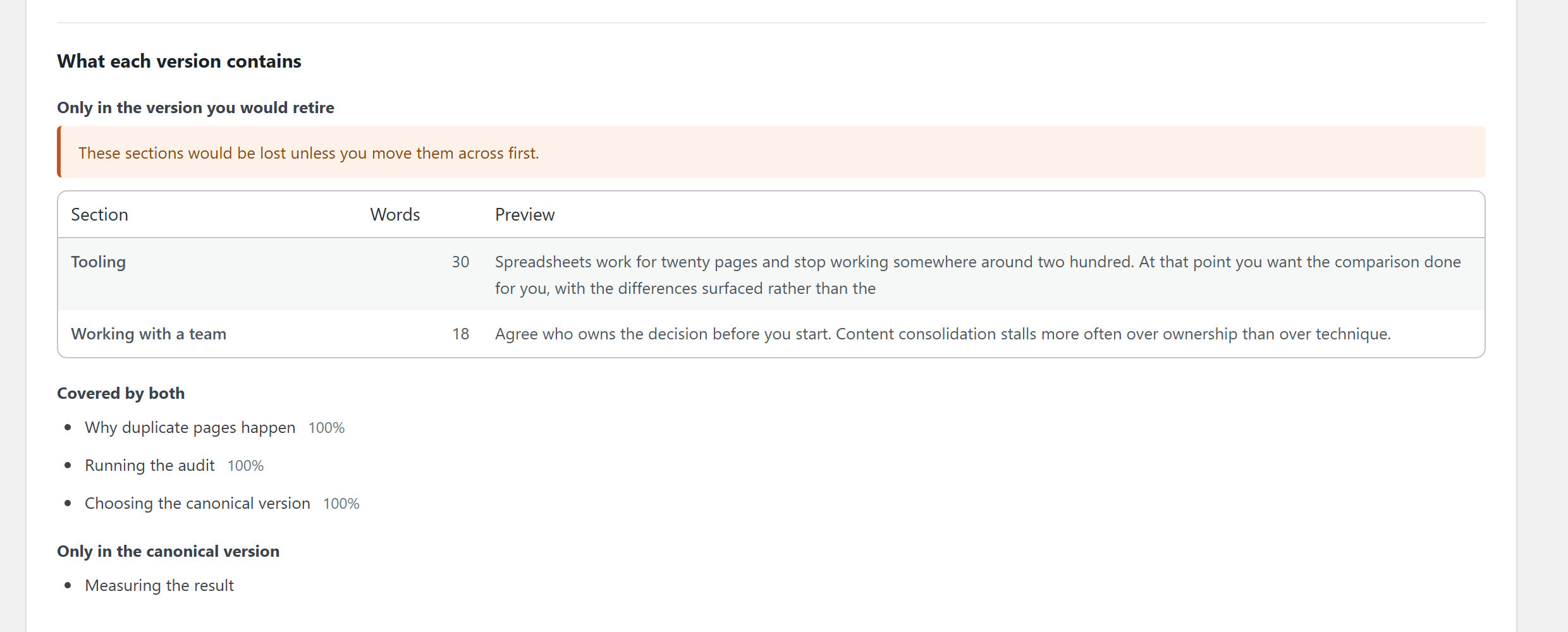
Posts are compared section by section, listing what exists in only one of them with its length and opening words
Move what matters into the post you keep before merging
Run the merge and redirects (Pro)
The problemEven with a plan, merging, redirecting and relinking are manual work
Pro runs the merge, creates 301 redirects, updates internal links in bulk and can roll back afterwards, each with confirmation
Dozens of merges are done inside WordPress, and every one can be undone
Screenshots
From finding duplicates to a merge plan



Free and Pro
Start free. Add Pro when you need it.
Free
Duplicate detection, a suggested version to keep with a six-signal breakdown, section comparison and a CSV redirect plan. No item limits, and posts are never edited.
Duplicate Content Auditor Pro
Runs the plan from the free version inside WordPress: merging, creating 301 redirects, updating internal links that point to merged posts, and rolling back afterwards, each with confirmation.
| Features | Free | Pro |
|---|---|---|
| Duplicate detection and six-signal scoring (no item limits) | ✓ | ✓ |
| Section comparison and redirect plan | ✓ | ✓ |
| CSV export | ✓ | ✓ |
| Run merges inside WordPress | — | ✓ |
| Create 301 redirects | — | ✓ |
| Update internal links that point to merged posts | — | ✓ |
| Rollback and operation log | — | ✓ |
Pricing
Turn the plan into action
Runs the plan from the free version inside WordPress: merging, creating 301 redirects, updating internal links that point to merged posts, and rolling back afterwards, each with confirmation.
What Pro adds
- Run merges inside WordPress
- Create 301 redirects
- Update internal links that point to merged posts
- Rollback and operation log
Duplicate Content Auditor Pro
¥4,980
- Use it on 1 site
- One-time purchase, no automatic renewal
Payment happens on Stripe’s checkout page. Your license key and download appear as soon as payment completes. Refund and cancellation policy (Japanese)Legal notice (Japanese)
Use cases
When it helps
A rewrite sits next to the original
Choose the version to keep on evidence, and check what only the old post had before merging.
A roundup overlaps a category page
Section-by-section comparison separates the overlap from what each page uniquely covers.
Dozens of pairs to merge (Pro)
Merge, redirect and relink in one pass, with every step reversible.
Features
All features
Detect
- Duplicate scan of posts, pages and custom post types
- Similarity threshold and excluded posts
- Every detected pair shown
- Automatic switch to character-level comparison for Japanese, Chinese and Korean
Decide
- Suggested version to keep, with a six-signal score breakdown
- Section-by-section comparison (shared content and content found in only one post)
- Check which sections a merge would lose
Plan
- Suggested redirects (source, target, status code)
- Duplicate report and redirect plan as CSV
- A format other redirect plugins can import
Run with Pro
- Merges with backup, preview and confirmation before running
- 301 redirect creation
- Bulk internal link updates
- Rollback after running, and an operation log
How it works
Getting started
Scan with the free version
Install the free version from WordPress.org and run a scan.
Choose the version to keep
For each pair, review the six-signal scores and section comparison and decide which post stays.
Export the plan
Export the redirect plan as CSV and carry it out by hand or with a redirect plugin you already use.
Run it all with Pro
With Pro, merges, redirects and internal link updates run inside WordPress, and can be rolled back.
Frequently asked questions
Frequently asked questions
Can I use only the free version?
Yes. Detection, the suggested version to keep, section comparison and the redirect plan export work with no item limits. Add Pro when you want merges and redirects carried out inside WordPress.
Does the free version edit my posts?
No. The free version only reads. It never merges, deletes, creates redirects or rewrites content.
How many sites can Pro be used on?
Sites per license: 1.
Is it a one-time purchase?
Yes. You pay once. There is no subscription and no automatic renewal.
Can the free version and Pro be active together?
Yes. Settings and the latest scan results from the free version are handed over in a form Pro reads, so there is nothing to set up again.
Does it compare Japanese posts correctly?
Yes. For languages written without spaces between words, it switches to character-level comparison automatically.
Does it work on large sites?
It never compares every post with every other post. Only likely pairs are compared, and scans run in smaller batches.
Before you buy
Terms and support
From purchase to first use
- Click “Buy Pro” in the pricing section and complete payment on Stripe’s checkout page
- Your license key and a download button for the Pro ZIP appear on the completion page
- Install the ZIP from Plugins → Add New → Upload Plugin in your WordPress admin and activate it
- Enter your license key on the plugin’s screen to activate it
- Back up your whole site (including the database) before running any merge
License, updates, cancellation and purchase recovery
- A one-time purchase. There is no subscription and no automatic renewal
- Sites per license: 1
- Lost your license key or download? Use purchase recovery
- See the refund and cancellation policy and the legal notice (both in Japanese)
What it does not do
- The free version does not merge, delete or create redirects (it exports the plan)
- Always back up your whole site before running a merge with Pro
- Detection is based on similarity, so overlap below the threshold is not reported
- It does not promise better search rankings
Data handling
| Data sent elsewhere | None. Fingerprinting, comparison, storage and display all happen inside WordPress |
|---|---|
| Account or API key | Not required (except Pro license checks) |
| What it stores | Three scan tables and settings |
| On uninstall | The free version removes its tables and settings, and leaves posts and other plugins’ data alone |
| Pro license checks | Pro contacts the HUBLO license server to check the license |
Requirements
- WordPress 6.2 or later
- PHP 7.4 or later
- Pro requires WordPress 6.4 or later
Getting the free version
WordPress.org plugin page. You can also search for “Duplicate Content Finder” under Plugins → Add New in your WordPress admin.
Choose the post to keep, and end the competition
Start with the free version to see how much overlaps. When you want merges done inside WordPress, add Pro.
Duplicate Content Auditor Pro¥4,980 (one-time purchase) · 1 site