HUBLO Auto Term Manager
Automatic category and tag managementWordPress plugin
More posts, no more sorting categories and tags by hand.
Classify posts with rules you define, check exactly what will change, then apply it in bulk. Add Pro and new or updated posts are classified automatically, with a daily or weekly audit on top.
Who it’s forSite owners with hundreds or thousands of posts for whom keeping categories and tags consistent has become a chore
Auto Term Manager Pro¥7,980/year · 3 sites
- Free: manual classification and audit
- Add Pro: automatic classification and scheduled audit
- Preview before every bulk change
- Assigned tags and categories stay if you stop Pro
What it does
Set the rules once, and your categories and tags stay consistent
Classify with rules
The problemTagging varies by author and by year
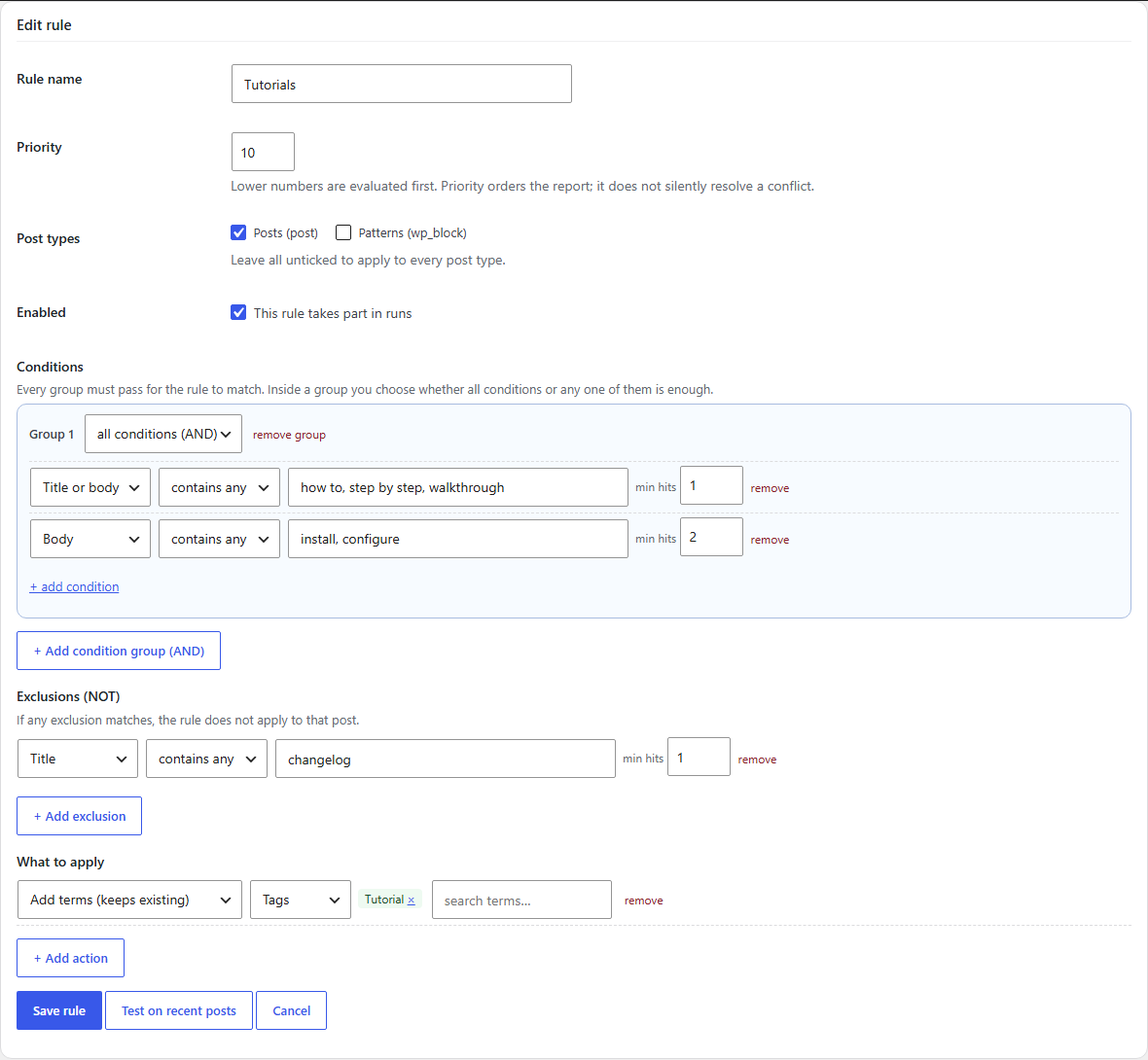
Combine conditions on title, content, excerpt and custom fields with AND/OR, add exclusions, and assign categories and tags
The whole site follows one consistent standard
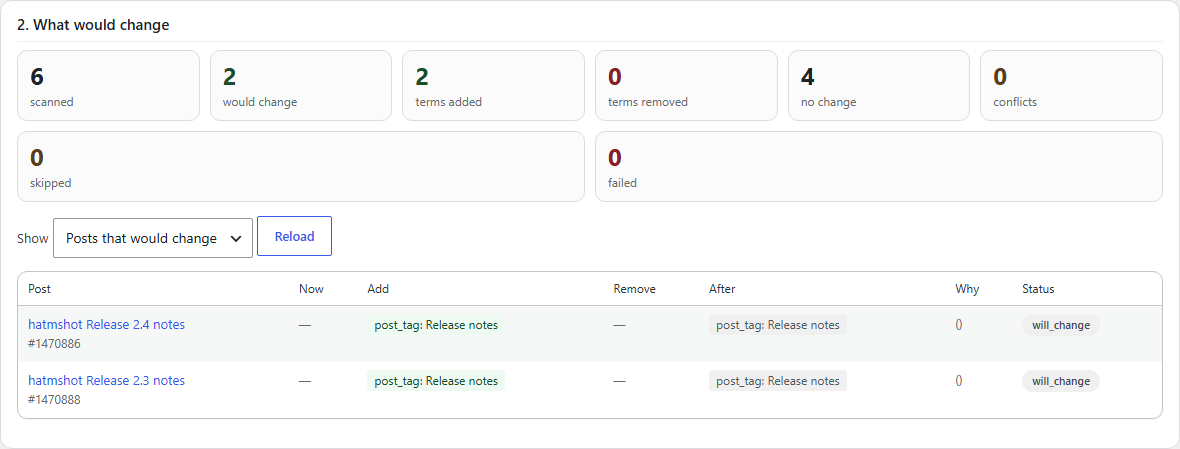
See the change before you apply it
The problemBulk replacements feel too risky to run
For each post, see its current terms, what will be added, what will be removed and the result, before anything runs
Apply hundreds of changes at once, knowing exactly what they are
Find drift and fix it in place
The problemYou cannot tell which posts follow your rules and which drifted
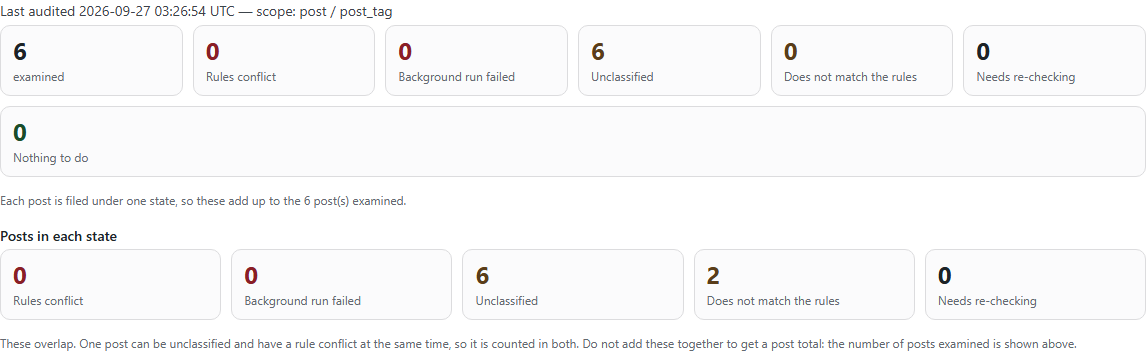
The audit sorts every post into six states, and you can fix drifted posts straight from the audit
You can always say what state your taxonomy is in
Automatic on publish and update (Pro)
The problemEvery new post still needs its terms checked
Pro adds automatic classification when posts are published or updated, plus a daily or weekly scheduled audit
You focus on writing while classification stays consistent
Screenshots
Rules, preview and audit, as they really look

Free and Pro
Start free. Add Pro when you need it.
Free
Create rules, preview, apply in bulk, and audit and fix your classification, all by hand. No item limits and no time limit.
Auto Term Manager Pro
Add Pro to the free version and posts are classified automatically whenever they are published or updated, with a daily or weekly scheduled audit. Pro uses the rules you already made in the free version.
| Features | Free | Pro |
|---|---|---|
| Rules (combined conditions, exclusions) | ✓ | ✓ |
| Preview and bulk apply (no item limits) | ✓ | ✓ |
| Classification audit and fixing from the audit | ✓ | ✓ |
| WP-CLI | ✓ | ✓ |
| Automatic classification on publish and update | — | ✓ |
| Scheduled audit (daily or weekly) | — | ✓ |
| Configurable audit history retention | — | ✓ |
Pricing
Add Pro and let classification and audits run automatically
Add Pro to the free version and posts are classified automatically whenever they are published or updated, with a daily or weekly scheduled audit. Pro uses the rules you already made in the free version.
What Pro adds
- Automatic classification on publish and update
- Scheduled audit (daily or weekly)
- Configurable audit history retention
Auto Term Manager Pro
¥7,980/year
- Use it on 3 sites
- Yearly, renews automatically, cancel anytime
- An add-on to the free version (get the free version on this page)
Payment happens on Stripe’s checkout page. Your license key and download appear as soon as payment completes. Refund and cancellation policy (Japanese)Legal notice (Japanese)
Use cases
When it helps
Media sites publishing almost every day
Pro classifies each post as it is published or updated, so tagging no longer varies from writer to writer.
Long-running sites with messy tags
Audit with the free version to see where things stand, write rules, preview, then bring everything in line in one go.
Teams with several writers
The rules become your shared classification standard, and scheduled audits confirm nothing drifts.
Features
All features
Rules
- Conditions on title, content, excerpt, custom fields and more
- Condition groups combined with AND, conditions inside a group with AND or OR
- Exclusions that cancel a match
- Works with categories, tags and custom taxonomies
Preview and apply
- Scanned and changed counts, with terms added, removed and the result per post
- Bulk apply after checking (no item limits)
- List of failed posts with retry
- A record of every job
Audit
- Every post sorted into six states
- Fix drifted posts from the audit results
- Preview, apply and audit from WP-CLI
Automate with Pro
- Automatic classification on publish and update (queued, so saving stays fast)
- Daily or weekly scheduled audit
- Audit history retention by count or days
- WP-CLI commands for automatic classification
How it works
Getting started
Install the free version
Download the free ZIP from this page and install it from Plugins → Add New → Upload Plugin.
Write rules and preview
Set your classification conditions and check which terms each post gains or loses.
Apply in bulk and audit
Apply once you are happy, then audit to confirm nothing drifts from your rules.
Automate with Pro
Add Pro, activate your license, and switch on automatic classification and scheduled audits.
Frequently asked questions
Frequently asked questions
Can I use only the free version?
Yes. Rules, preview, bulk apply, audit and fixing all work in the free version, with no item limits and no time limit. Pro adds automatic classification on publish and update, plus scheduled audits.
Can I use Pro on its own?
Pro is an add-on to the free version. Activate the free version, then install Pro alongside it. The free version is available on this page.
How many sites can I use it on?
One license can be activated on up to 3 sites. To move it, deactivate it on the old site and activate it on the new one.
If I stop Pro, is my classification undone?
No. Only automatic classification and scheduled audits stop. Assigned tags and categories, rules, settings and audit results all stay, and the free version keeps working.
Can I cancel at any time?
Yes. Payment methods, invoices and cancellation are handled in the Stripe Customer Portal, linked as “Manage billing” on your purchase completion page. After cancelling you keep Pro until the end of the period you paid for.
Will saving posts get slower?
No. Pro does not classify inside the save itself; posts are queued and processed a few at a time.
Does it work alongside other HUBLO Pro plugins?
Yes. Each plugin checks only its own license.
Before you buy
Terms and support
From purchase to first use
- Download the free version from this page, install it and activate it
- Click “Buy Pro” in the pricing section and complete payment on Stripe’s checkout page
- Your license key and a download button for the Pro ZIP appear on the completion page
- Upload the Pro ZIP the same way and activate it (keep the free version active)
- Activate your license under “Auto Term Manager → License”, then switch on automatic classification and the audit schedule
License, updates, cancellation and purchase recovery
- One license can be activated on up to 3 sites. Deactivate it on a site you no longer use to move it to another
- A yearly subscription that renews automatically until you cancel. After cancelling you keep Pro until the end of the period you paid for
- The license is checked periodically. If the license server cannot be reached for a while, Pro keeps working for a grace period
- If the license lapses, automatic classification and scheduled audits stop. Assigned tags and categories, rules, settings and audit results are not deleted, and everything resumes without reconfiguration when the license is back
- Sites with an active license receive Pro updates from the normal WordPress Updates screen
- Payment methods, invoices and cancellation are handled from “Manage billing” on your purchase completion page
- Lost your license key or download? Use purchase recovery
- See the refund and cancellation policy and the legal notice (both in Japanese)
What it does not do
- Pro is an add-on to the free version. If the free version is deactivated, Pro shows “The free version is required” and stays idle
- In the free version, changes run only after you review the preview and start them yourself
- Classification follows the rules you write. It does not guess meaning from the text
- The free version is being prepared for WordPress.org. Until then it is distributed from this page
Data handling
| Outbound connections | The free version makes none |
|---|---|
| Pro license checks | Pro contacts the HUBLO license server to check the license and updates. It sends only the license key and an identifier derived from the site address, never post content |
| What it stores | Rules, job records and audit results, in this site’s database |
| On uninstall | The plugin’s settings and records are removed. Assigned tags and categories are your data and are kept |
Requirements
- WordPress 6.4 or later
- PHP 7.4 or later
- Pro runs on sites where the free version is active
Verify the free download
Free version 1.0.0 is available as a ZIP download from this site. Install it from Plugins → Add New → Upload Plugin in your WordPress admin.
SHA-256: ff4e3eb08b59002b6a754ecee6a82c7ef97dd45d174b36c47e2fe5d103da986e
Leave classification to your rules
Write rules and audit with the free version. When you want every new post classified for you, add Pro.
Auto Term Manager Pro¥7,980/year · 3 sites